
Understanding instructions and stylesheets
For any writing assignment, make sure you understand what kind of text you are expected to submit.
Many students who are new to the demands of university writing struggle with instructions, not knowing how to approach their writing tasks. Similarly, students who transfer from one discipline or faculty to another may experience new demands. Whether you have been asked to write an essay or an assignment of some other kind, understanding the instructions as well as the grading criteria will be essential. Ask your teacher if you have any questions; academic writing is a wide field, and the information provided on AWELU is by necessity general, not course or subject specific.
If you are writing a degree project or an MA thesis, or if you are submitting a text to an academic publisher, you will most likely have received detailed guidelines in the form of a stylesheet. Many departments, and even courses, have their own stylesheets, as do journals and publishers. Such guidelines stipulate format as well as structure and reference style.
Below, we explain common terms in instructions and stylesheets, and at the end of the page, you find two videos on understanding instructions and interpreting stylesheets.
Common terms in writing instructions and stylesheets
Typeface, font and font size
The terms typeface and font are often used interchangeably. A typeface is a set of characters of the same design (such as Times New Roman), whereas font refers to the specific version of the typeface that is to be used (such as Times New Roman bold, 12 p).
There are many typefaces/fonts, and depending on their appearance, they are divided into sans serif and serif. A serif is a little line at the bottom and top of some letters. On this webpage we use a sans serif typeface (i.e., without serifs) in the running text,, whereas you see a serif typeface in the headings.
Typeface and font size are often stipulated in instructions and style sheets. If you have not received any information, choose a neutral typeface and font size, such as Times New Roman 12p.
Line spacing
Line spacing is the space between the lines of text in your document. A common line spacing is 1.5.
Margins and justification
Instructions sometimes specify the width of the margins; if not, use the default setting of your word processing programme.
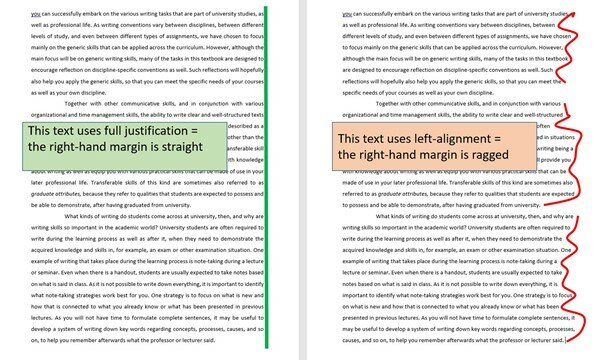
You will sometimes be required to set the justification. In running text, there are two common formats: full justification, which means that both the left-hand and the right-hand margins are flush (straight) and left-alignment, which means that the right-hand margin is ragged. See the illustration below:
Pagination
Sometimes, documents are to be paginated, which means that you need to insert page numbers, usually at the bottom of the page.
Titles, headings, sub-headings, and numerals
The title is the name you give your essay or article, and it appears at the top of your document, often together with your name. Headings and sub-headings refer to the names of sections and sub-sections, respectively. Sometimes numerals are required, and if there are several levels of headings in the text, such numerals will usually be structured as follows:
1. Heading
1.1 First sub-heading
1.2 Second sub-heading
etc.
When it comes to numerals, there are different formats; the example above uses Arabic numerals, but you may also be required to use Roman numerals.
Chapters, sections and paragraphs
Although the words chapter and section are sometimes used interchangeably, a chapter is usually a part of a book, whereas a section is a part of an essay or an article. Each section (or chapter) of a text will be divided into paragraphs. Read more about these matters here:
Indicating a new paragraph
There are two ways of marking new paragraphs: either you leave a blank line between paragraphs, or you indent the first line of each new paragraph (usually not the very first line after a heading, though).
Word count
Essay guidelines as well as journal publishers often stipulate the expected length of the text. Word counts are usually not recommendations but requirements, so if you plan to exceed the given word count, always contact your teacher or the journal before submitting to check if there is some leeway.
References
Style sheets provide information about which reference style to use. You will find information about referencing on AWELU, but make sure you check what guidelines your teacher or publisher has provided, as some departments and journals have so-called in-house styles, which may differ from reference styles you have previously used.
Further reading
Video: Interpreting the task
Using a style sheet
Instructional videos from the online MOOC "Writing in English at University" which was developed at Lund University in 2016. All videos from this MOOC are available on YouTube.